The vet report: your logs as a PDF
The vet report in Kwispel gathers your logs from the last 7, 30 or 90 days, or a custom period, into a single PDF. You add your questions for the vet and share the file. The first line reads: “This report contains logged facts only. It is not a diagnosis and does not replace veterinary advice.”
Written by the Kwispel team. We make Kwispel. Checked against Kwispel 1.5.6 on 25 September 2026. Spotted a mistake? Email [email protected] and we will fix it.
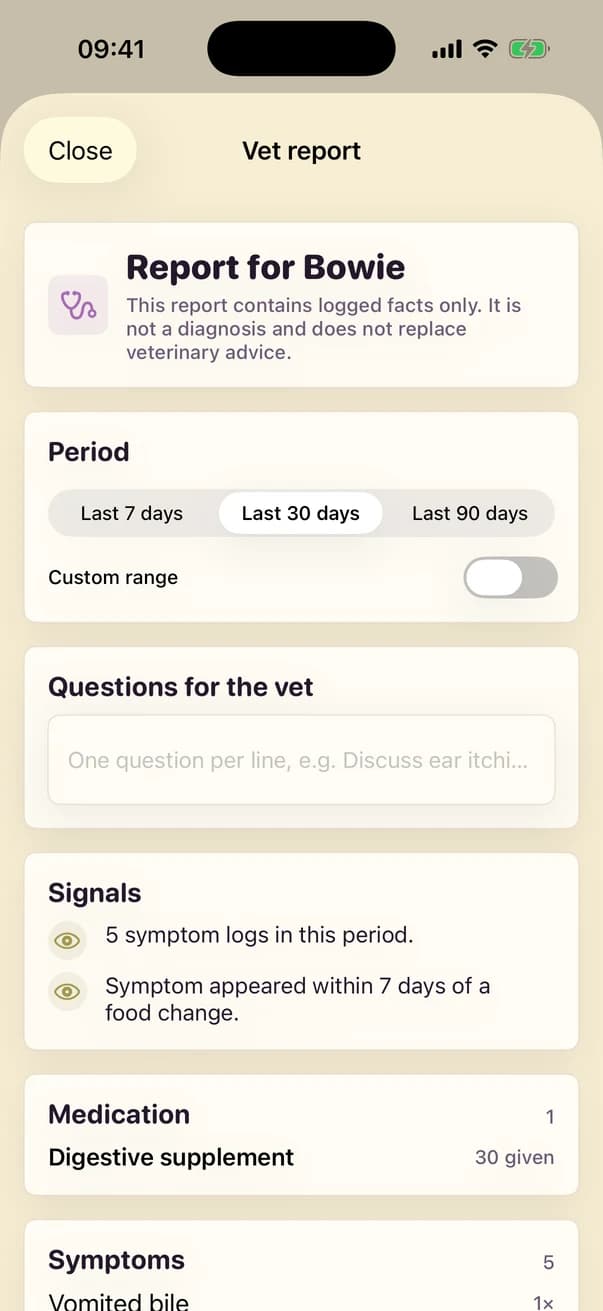
What is in the report?
- SignalmentBreed, sex, neutered or not, date of birth, weight and microchip number.
- Allergies and conditionsFrom the conditions you created.
- MedicationHow many times each medicine was given.
- Symptoms and bathroomHow often each symptom was logged, and poop or pee noted as not normal.
- Weight and vitalsWeight over the period and the latest readings.
- Vaccination history and foodVaccinations with date and note, and meals logged as refused.
- Vet notesWhat you wrote down when you logged a vet visit.
- Questions for the vetOne question per line, exactly as you type them.
What does the report leave out?
Check-ins, parasite treatments, walks, grooming and expenses are not in the vet report. For a full day-by-day timeline that includes the check-ins, share the care report instead: a second PDF covering 7 or 30 days or a custom period.
You open the report from the Health tab with Share with vet, or through Profile › Vet logbook › Create vet report.
What the report is not
- It is not a diagnosis and gives no advice: it holds only what you or your pack logged.
- It is a PDF; there is no export to CSV or another file format.
Kwispel for iPhone
Your dog’s log, shared with everyone who helps care for them.